Magic-wand selection
Click one pixel. Select the whole shape.
A click-seeded magic-wand image selector in pure C# - zero dependencies outside the .NET base library. Part of the OnlyCSharp educational library.
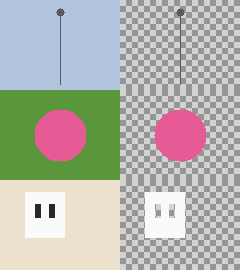
How it works
You click a pixel; the wand grows one contiguous region of pixels perceptually similar to that seed color, measured as a CIELAB dE tolerance flood fill. The raw mask is cleaned with a morphological close, then traced into a simplified silhouette outline via marching-squares contour stitching.
- Lab-space tolerance flood - perceptual color distance, not raw RGB, so it follows what the eye reads as "the same color".
- Morphological cleanup - closes pinholes and ragged edges in the selection mask.
- Contour stitching - the one genuinely-new primitive; marching squares plus loop stitching plus polyline simplification into a clean vector outline.
Single selection, step by step


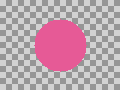
Command line
The tool is a console app. The selection above was produced by:
imgtool wand input.png cutout.png --x 60 --y 45 --tolerance 12
Beyond the Tier-1 wand, later milestones add a GrabCut foreground segmenter (graph-cut min-cut over Gaussian color mixtures), a recognition layer (Hough lines + geometric shape descriptor), and a photo-to-3D inflation pipeline (Teddy silhouette inflation to a watertight, photo-textured solid) - all in pure C#.