Hough shape & line detection
Finds the lines and circles hidden in an image.
Classic Hough transforms - no training, no models - pure C# on top of the OnlyCSharp educational library's own Canny/Sobel edge detectors.
Circle detection
A gradient-directed Hough circle vote finds round shapes and draws each one in green with a center cross. Below, VisionKit locates the coins in a synthetic fixture.

1. Input
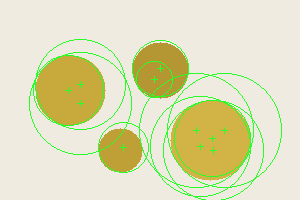
2. Detected circles
Line detection
Canny edges feed a Hough line vote; each detected straight line is drawn full-frame in red over the original. Here it recovers the walls, floor, eave, and roof edges of a simple house outline.

1. Input
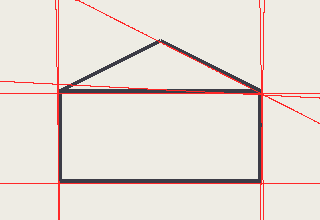
2. Detected lines
How it works
- Edges first - the image is grayscaled and run through OnlyCSharp/1.8's real Sobel gradient and Canny edge detector.
- Hough lines - every edge pixel votes for the family of lines through it in (rho, theta) space; peaks in the accumulator are the straight lines.
- Hough circles - edge pixels vote along their gradient direction for candidate centers across a radius range; accumulator peaks become circles.
Command line
VisionKit is an offline console tool. The demos above were produced by:
visionkit circles coins-in.png coins-out.png --threshold 18 --low 30 --high 90
visionkit lines shapes-in.png shapes-out.png --threshold 80 --max 8